
It’s an interesting time to be a Flex radio owner. I have a Flex 6400 in the shack and absolutely LOVE it. (Moving from my ICOM 7300 to the Flex got me out of COM port purgatory and made remote operation significantly simpler. My equipment is all in my basement, and I now primarily operate “remotely” from my home office upstairs.) But two events recently came together to create an “operating shock” for me that caused me to re-evaluate my setup and operating practice:
- SmartSDR 4.2.18 changed the way DAX endpoints are named, making it incompatible with SliceMaster. SliceMaster is a tool that many Flex owners (including me) use to configure and launch programs like WSJT-X. I assume an update to SliceMaster will eventually resolve the issue. But after I upgraded to 4.2.18 – and my setup broke – this created a willingness in me to look around and consider alternative setups.
- About the same time I heard about AetherSDR – an open source reimplementation of the SmartSDR software that is better than the original SmartSDR in a number of ways (I’m still exploring and learning about all its improvements). Importantly for purposes of this blog post, AetherSDR implements the new Transceiver Control Interface (TCI).
TCI dramatically simplifies setup and configuration across modern amateur radio software. As the TCI website explains,
TCI (Transceiver Control Interface) is a network interface for control, data transfer and synchronization between transceiver/receiver, contest loggers, digital mode software, skimmers and other software, as well as external power amplifiers, bandpass filter units, antenna switches, radio controllers and other devices.
TCI was created as a modern alternative to the outdated COM port and audio cable interfaces, it uses a full duplex web socket protocol that runs on top of a TCP connection and serves for server-client communications, providing cross-platform connectivity. Transceiver works as a server, all other software and devices as clients. The server and clients can be inside the same computer (program-server, hardware log, etc.-clients) and/or in separate physical devices connected through the local network (classical transceiver, power amplifier, antenna switch, FFT unit, etc.).
The TCI interface contains basic transceiver control commands (analog of CAT system), receives CW macros from clients and broadcasts them, outputs transceiver IQ stream to clients, receives spots from skimmers and Internet clusters, receives/outputs audio signal to work in digital modes.
In other words – no more COM ports to fight with!! TCI basically runs as a little webserver and your other radio software (like WSJT-X) just connects to the webserver for audio, rig control, etc.. Did I mention no more COM ports to mess with??
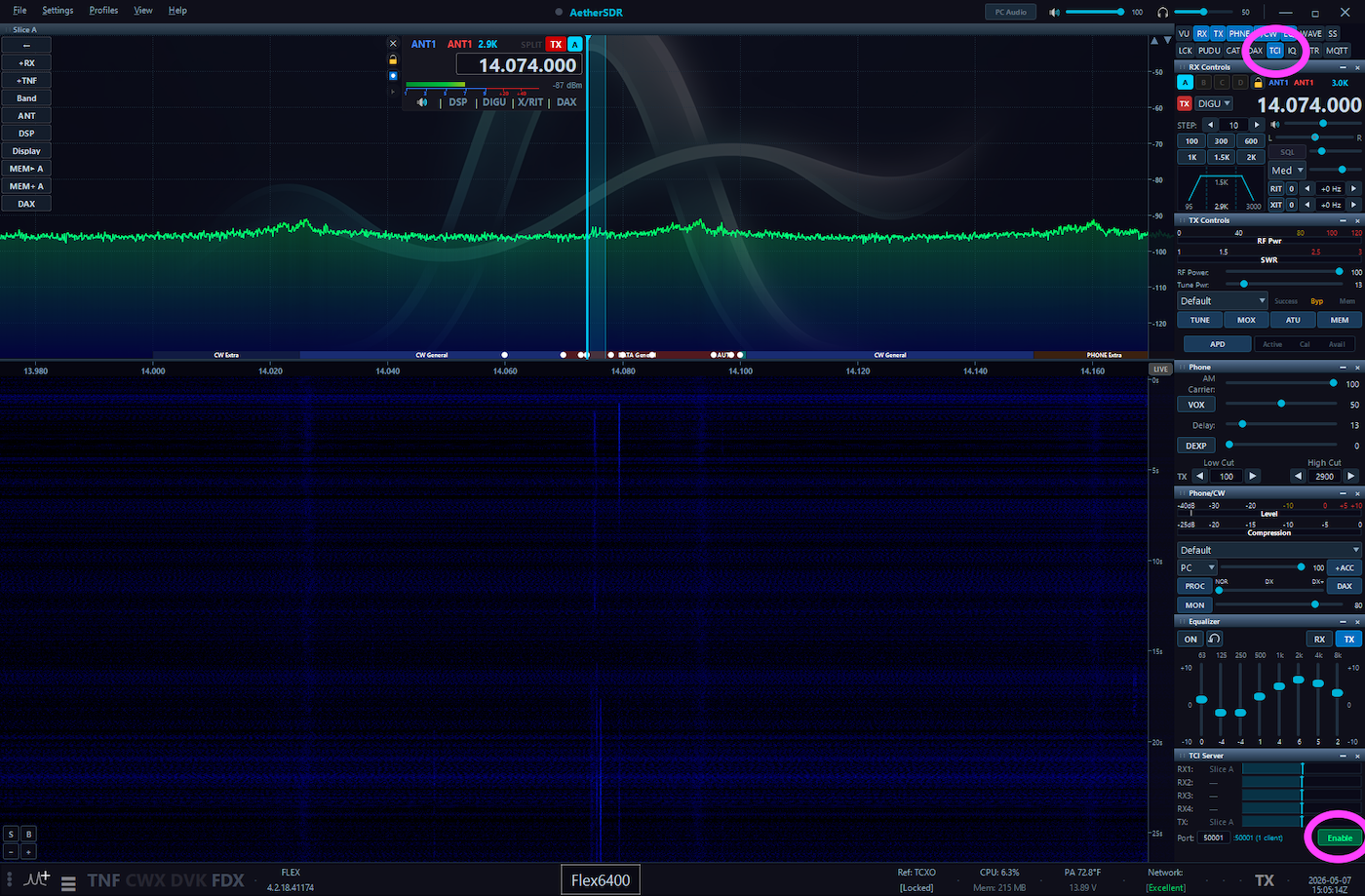
The setup literally could not be simpler. In AetherSDR, go to the top right and click to show the TCI panel. The TCI panel will then show up at the bottom right. Click the Enable button to turn on TCI. See the two pink circles on this screenshot:
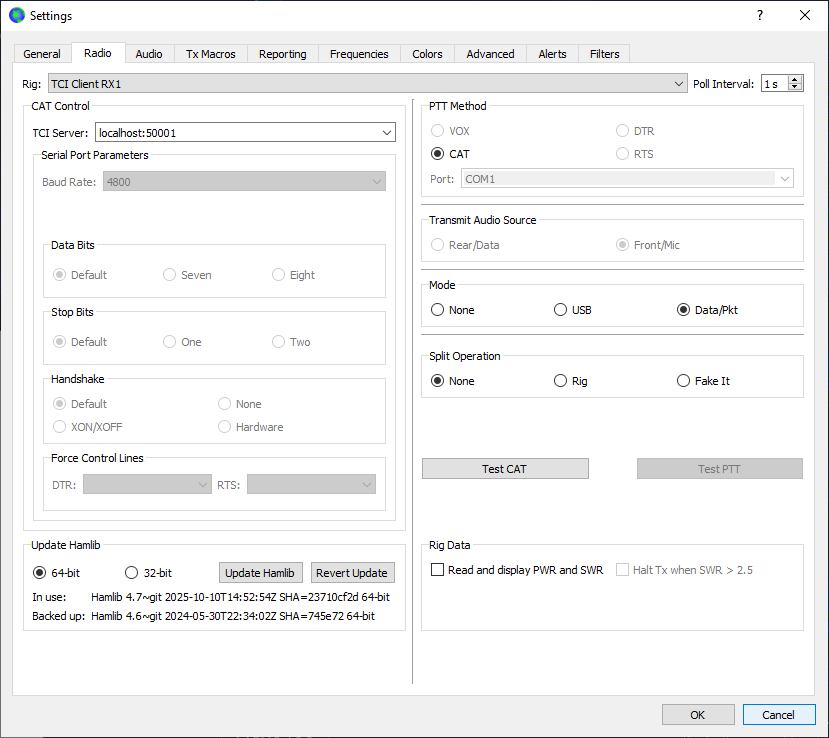
Then in WSJT-X v3.0.0 Improved, go into the Radio tab. For “Rig:” select TCI Client RX1. For “TCI Server:” enter the IP address of the computer where AetherSDR is running (or localhost if AetherSDR and WSJT-X are running on the same computer), followed by :50001 (a colon and 50001). Other settings as in the screenshot below.
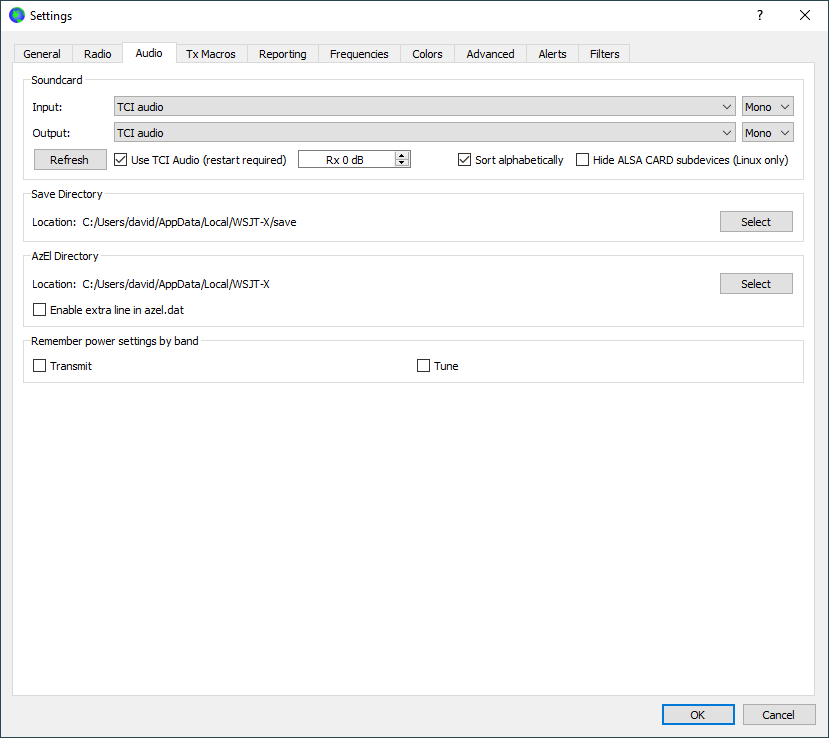
Then go to the Audio tab, check the “Use TCI Audio” box, and hit Refresh. Then select “TCI audio” for both Soudncard Input and Output. (If “TCI audio” doesn’t show up, just restart WSJT-X and then come back to the Audio tab. They’ll be there.)
And that’s it!
